
Add Multiple Dashboards
You can create multiple customized dashboards to get the right data for different people, places, and teams. These can be private to you, shared account-wide, or shared with specific people or groups.
To create a new dashboard:
-
On the "Dashboard" tab, click the arrow next to the dashboard name to bring up a drop-down menu.
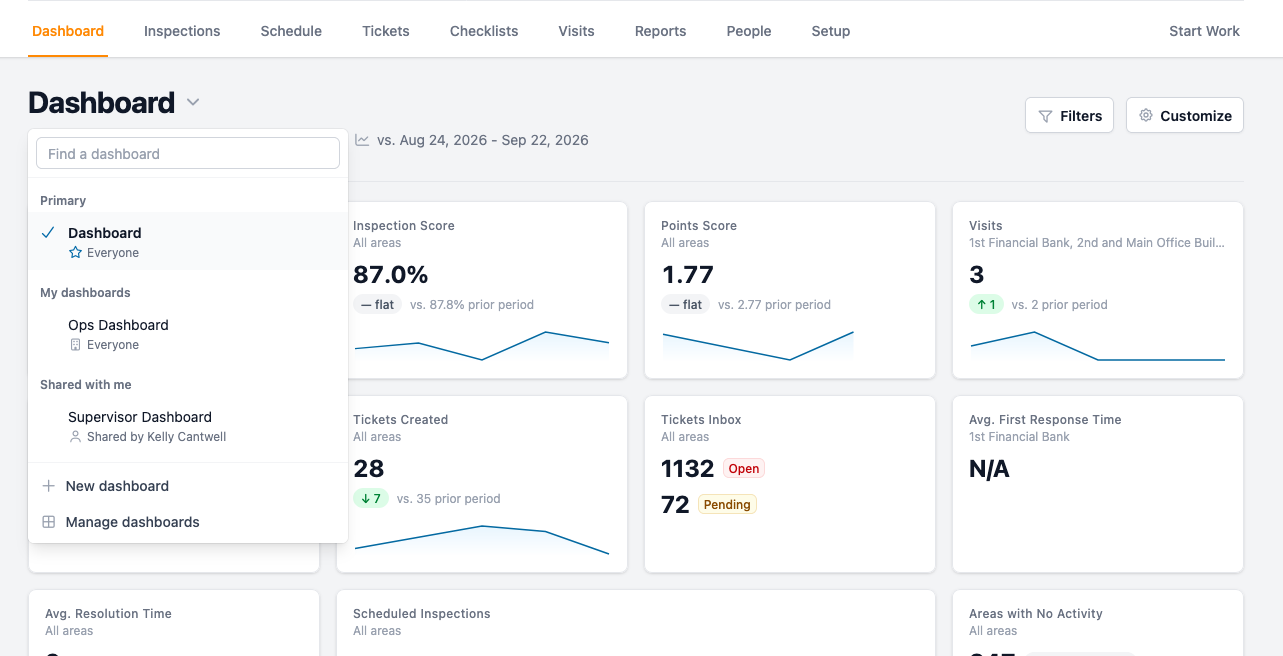
- Click "+ New Dashboard."
- Name your dashboard (for example, "Ops Dashboard" or "Supervisor Dashboard") and choose if you want to start with a blank dashboard, or copy the main dashboard and modify it. The new dashboard will initially be private only to you, but you can change this in the next step.
- Click "Create Dashboard."
- Choose the default date range for the dashboard. Users will still be able to filter for specific dates, but this is what will appear on opening the page. Then, click "Save" next to the date range.
-
Set sharing settings:
Private dashboards will only appear on your list and can only be accessed by you.
Shared dashboards can be shared with specific people or groups; choose from the list or begin typing to search the list. Users will only see metrics and charts for data they can access.
Dashboards for everyone on your account will be visible in the drop-down menu and accessible for everyone with a user account. Users will only see metrics and charts for data they can access.
- Once you've chosen your sharing settings, click "Save sharing."
- Customize the layout with metrics and charts, which can be organized into sections. See Customize Your Dashboard for more information on the options. You can drag and drop the cards to reorganize them and use the arrows to change the order of sections. This will save as you add and edit.
Your new dashboard will now be accessible from the drop-down menu that appears when you click the "Dashboard" title. If you'd like to make changes or set this dashboard as your primary dashboard, click "Manage dashboards" in the drop-down menu. This brings up all your dashboards with options to edit, change ownership, make a copy, set as primary, or delete the dashboard.